Time Tracking Apps That Keep You Accountable
Time Tracking Apps That Keep You Accountable
Ever find yourself staring at the clock, wondering where your day went? You’re not alone. In today’s fast-paced world, staying productive and maintaining focus can feel like an uphill battle. The good news — time tracking apps that keep you accountable are here to transform your digital workflow. Whether you’re a student, professional, or creator, these tools help you reclaim your time and boost your productivity with ease. Stick around, and you’ll discover the best apps and smart accountability features that make focus effortless.
Top Time Tracking Apps to Boost Your Productivity Daily
If you want to tame your time and sharpen your focus, choosing the right time tracking app is crucial. The market is packed with options, but not all apps are created equal when it comes to accountability and user-friendly design. Let’s break down some of the top contenders for 2025 that can help you stay on track, every day.
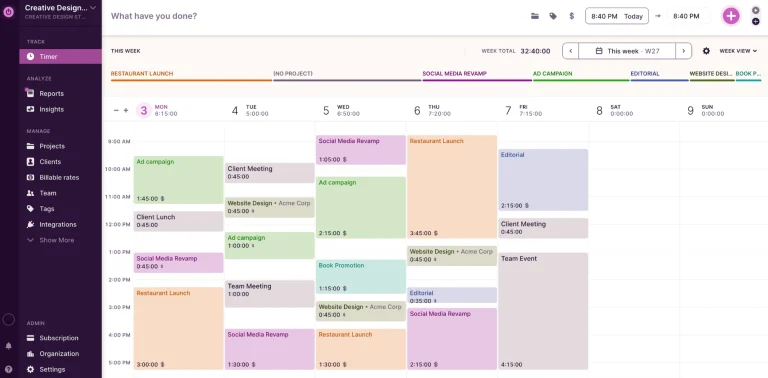
First up is Toggl Track, a favorite for its simplicity and powerful reporting features. It lets you start and stop timers with a single click, track time across devices, and generate detailed productivity reports. The best part? Toggl’s reminders and idle detection nudge you to stay honest with your work hours. If you’re juggling multiple projects, it’s a free tool that offers seamless integration with popular project management apps like Asana and Trello.
Another standout is RescueTime, which works quietly in the background to analyze how you spend your time online. Unlike manual timers, RescueTime provides real-time insights and blocks distracting websites automatically if you enable FocusTime. This AI-powered tool is perfect for anyone wanting to understand their habits deeply and build better routines. Plus, it offers a free version with essential features, making it accessible for students and freelancers alike.
Finally, Clockify deserves a shoutout for combining time tracking with team collaboration. It’s ideal if you want both personal accountability and transparency with your team’s workflow. Clockify’s dashboards highlight how productive your day is, and its Pomodoro timer helps break work into manageable bursts. The free plan is robust, and the app’s AI-assisted features help you identify time leaks effortlessly.
💡 Quick insight: Most people waste hours switching apps — these tools fix that by consolidating your time management in one place.
For more on managing your digital workflow, check out our post on Best Free Project Management Tools for Creators.
Toggl Track | RescueTime | Clockify
How Accountability Features Help You Stay Focused Longer
Accountability isn’t just about tracking hours — it’s about creating a system that motivates you to stay productive without burning out. The best time tracking apps embed accountability features that transform your habits and mindset around work.
One powerful feature is automatic reminders. When you forget to start or stop a timer, apps like Toggl or Clockify gently remind you, preventing lost or inaccurate tracking. This keeps your data honest and helps you reflect on where your time really goes. Over time, these nudges build self-discipline and reduce procrastination.
Another game-changer is goal setting and progress visualization. Many apps allow you to set daily or weekly targets and then display your progress through charts or streaks. Seeing your achievements in real-time is surprisingly motivating. It taps into your natural desire to complete tasks and maintain momentum. RescueTime’s FocusTime mode, for example, locks you out of distractions and rewards you with productivity reports, reinforcing positive habits.
Finally, social accountability can elevate your focus. Apps like Clockify let you share your tracked hours with teammates or study groups, creating a sense of friendly competition and support. Knowing others are aware of your progress makes it harder to slack off. Plus, some apps integrate with communication tools like Slack, so you can celebrate wins or ask for help without leaving your workflow.
🚀 Pro tip: Bookmark this post, you’ll want to revisit these tools later as your productivity system evolves.
For a deeper dive into boosting focus, see our guide on How to Build a Distraction-Free Digital Workspace.
Clockify Features | RescueTime Features
The Role of AI in Next-Gen Time Tracking Apps (2025 Edition)
The 2025 Edition of time tracking apps is all about AI-powered accountability. These smart tools don’t just log your hours; they predict your productivity patterns and offer personalized suggestions to optimize your day.
Take Timely for example. It uses AI to automatically track everything you do on your computer and mobile devices without manual input. This means no more forgetting to start timers or guessing how long tasks took. The AI organizes your time into projects and meetings, giving you a crystal-clear picture of your digital habits. This hands-off approach is perfect for busy professionals who want to focus on work, not admin.
Another AI-driven app gaining traction is Focus Booster. It combines the classic Pomodoro technique with AI insights, adjusting your work and break intervals based on your focus levels throughout the day. It even suggests ideal times for deep work sessions or lighter tasks, helping you avoid burnout and maintain steady productivity.
AI also enhances time management analytics. Apps like RescueTime now use machine learning to identify your most productive hours and recommend when to schedule high-priority tasks. This data-driven approach helps you work smarter, not harder, by syncing your workload with your natural rhythms.
💡 Quick insight: AI tools can save you hours weekly by automating time tracking and offering actionable productivity insights.
Explore more AI productivity tools in our article on Top Free AI Tools for Work and Study.
Timely | Focus Booster
Integrating Time Tracking into Your Daily Routine Without Stress
One of the biggest hurdles to consistent time tracking is the feeling that it’s just “one more thing” to do. The secret? Choose apps that seamlessly integrate into your existing workflow and require minimal effort.
Start by linking your time tracker with the tools you already use. For instance, Toggl and Clockify connect with calendars, task managers, and communication platforms. This means you can start timers directly from your to-do list or Slack without switching apps. The less friction, the more likely you are to keep tracking time accurately.
You can also automate routine tasks with AI-powered assistants. Some apps let you set rules like “start tracking when I open this document” or “pause timer when I’m on a break.” These smart automations reduce manual input and keep your focus on work, not the app.
Lastly, build time tracking into your daily rituals. For example, review your tracked time during a morning or evening planning session. Reflect on what worked and adjust your goals accordingly. This habit turns time tracking from a chore into a powerful productivity booster.
🚀 Pro tip: Try setting a daily 5-minute review to analyze your time logs — it’s a game-changer for digital organization.
For more tips on streamlining your day, check out How to Automate Daily Tasks With Free Digital Tools.
Toggl Integrations | Clockify Integrations
Balancing Work and Life with Smart Time Tracking
The ultimate goal of time tracking apps isn’t just to work harder but to work smarter — so you can enjoy more life outside your screen. Accountability features help you maintain a healthy work-life balance by highlighting when you’re overdoing it and encouraging breaks.
Many apps now include break reminders and enforce downtime. RescueTime’s FocusTime feature, for example, blocks distracting sites during work hours but also nudges you to step away when you’ve been working too long. This helps prevent burnout and keeps your mind fresh.
Tracking your time also reveals hidden patterns, like overtime or weekend work creeping into your schedule. Once you see these trends, you can make conscious choices to protect your personal time. Setting boundaries becomes easier when you have data backing your decisions.
Finally, sharing your time logs with family or accountability partners can improve communication around your availability. It creates transparency and reduces stress by setting clear expectations. When you use time tracking apps thoughtfully, they become tools for both productivity and well-being.
💡 Quick insight: The best productivity apps help you work less but better, freeing up time for what truly matters.
For strategies on balancing work and life, visit our post on Creating Boundaries in a Digital World.
RescueTime
Accountability is the secret ingredient to lasting productivity, and time tracking apps that keep you accountable make it achievable and even enjoyable. From AI-powered automation to smart reminders and social features, these tools help you focus longer, work smarter, and reclaim your time. Start small, pick an app that fits your style, and watch your daily productivity soar. Your future self will thank you for taking control today. Next read: How to Automate Daily Tasks With Free Digital Tools →