Remote Work Productivity Apps: Your 2025 Guide to Focus and Efficiency
Working from home sounds ideal until distractions pile up and your to-do list grows longer by the minute. You’re not alone if you’ve struggled to keep focus and manage your time effectively in a remote setup. The good news? Remote work productivity apps are here to transform your daily routine. Whether you’re a professional, student, or creator, these tools can streamline your workflow and boost your focus instantly. In this post, you’ll discover top apps and how AI-powered features are revolutionizing time management in 2025. Ready to work smarter, not harder? Let’s dive in!
Top Remote Work Productivity Apps to Boost Your Focus
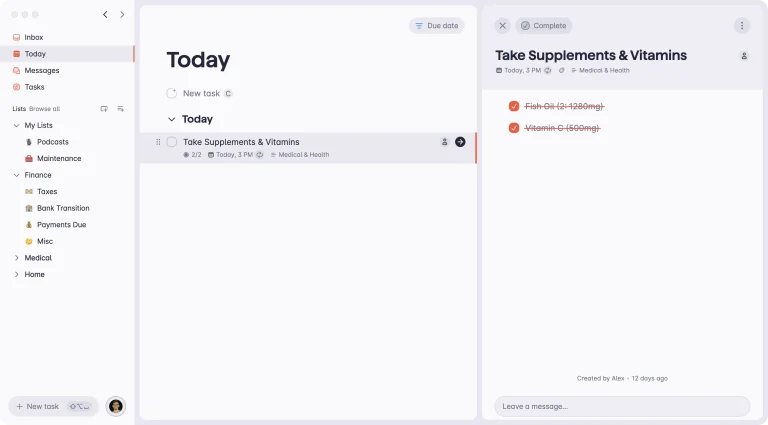
Finding the right apps to enhance your focus during remote work can feel overwhelming. Fortunately, several free and powerful productivity apps have emerged as favorites among remote professionals. Apps like Trello and Asana offer intuitive task management boards that help you prioritize and visualize your workload. You can easily break projects into smaller tasks, assign deadlines, and track progress—all in one place. This digital organization reduces mental clutter and keeps your focus sharp.
Another standout is Forest, a unique app that encourages focus by gamifying your work sessions. Plant a virtual tree and watch it grow as you avoid distractions. It’s a simple but effective way to stay motivated during deep work periods. Plus, Forest integrates with other tools and offers a free version that fits perfectly into any digital workflow. If you struggle with staying off your phone, this app is a game changer.
Don’t overlook Notion, which has become a Swiss Army knife for remote workers. It combines note-taking, task management, and database features in one customizable platform. You can create templates for meeting notes, project plans, or even personal goals. The flexibility of Notion means you can tailor your workspace to fit your unique needs, improving both productivity and focus. Give at least one of these apps a try—you’ll be surprised how simple this is.
Trello | Forest | Notion
💡 Quick insight: Most people waste hours switching apps — these tools fix that.
How AI-Powered Tools Transform Time Management in 2025
AI isn’t just a buzzword—it’s a productivity powerhouse shaping how we manage time remotely in 2025. AI-powered apps like Clockwise and Motion automatically optimize your calendar by rearranging meetings and blocking focus time. This means less manual scheduling and more uninterrupted work periods. Imagine your calendar working for you instead of the other way around!
Another AI marvel is Otter.ai, which transcribes meetings in real-time, making note-taking effortless and searchable. This frees you to engage fully during discussions without worrying about missing details. Plus, AI tools are increasingly integrated with popular platforms like Zoom and Microsoft Teams, creating a seamless digital workflow that enhances collaboration and reduces time wasted on administrative tasks.
For those juggling multiple projects, AI-driven prioritization tools like ClickUp help you identify what matters most by analyzing deadlines, task dependencies, and your work patterns. These insights empower you to focus on high-impact activities, improving your overall time management and work-life balance. Don’t miss out on how AI can simplify your day—try one of these apps and watch your productivity soar.
Clockwise | Motion | Otter.ai
Best Free Tools for Digital Organization and Workflow Efficiency
When working remotely, keeping your digital life organized is crucial. Free tools like Google Workspace and Microsoft 365 offer robust suites for email, documents, and cloud storage that sync seamlessly across devices. This ensures your files and communications are always accessible and secure. Using these free apps can drastically reduce friction in your daily tasks.
For team collaboration, Slack remains a top choice. Its channels and direct messaging keep conversations organized, while integrations with apps like Google Drive and Zoom streamline your workflow. Plus, Slack’s free tier supports a generous amount of message history and app integrations, making it perfect for small teams or solo professionals who want to stay connected without paying a dime.
If you want to go beyond basic organization, try Zapier to automate repetitive tasks between your favorite apps. For example, you can automatically save email attachments to cloud storage or create tasks from calendar events. This kind of automation frees up mental bandwidth, letting you focus on meaningful work instead of busywork. These free tools are foundational for building a smooth, efficient remote work environment.
Google Workspace | Slack | Zapier
🚀 Pro tip: Bookmark this post, you’ll want to revisit these tools later.
How to Maintain Focus and Avoid Burnout with Remote Work Apps
Remote work can blur the lines between personal and professional time, leading to burnout if you’re not careful. Luckily, apps like RescueTime help you track how you spend your digital hours. By understanding your habits, you can identify distractions and create boundaries that protect your focus and well-being.
Another helpful app is Headspace, which offers guided meditations tailored for work stress and focus. Taking short mindfulness breaks can refresh your brain and prevent fatigue. Integrating these wellness tools into your routine promotes a healthier approach to productivity, ensuring you stay energized throughout the day.
Finally, consider using Focus@Will, a music app scientifically designed to boost concentration. It offers playlists that enhance your brain’s ability to focus, especially during long work sessions. Combining these tools with smart scheduling and task management creates a balanced workflow that supports both efficiency and mental health.
RescueTime | Headspace | Focus@Will
Mastering remote work productivity is easier than you think when you have the right apps by your side. From task management and AI-powered scheduling to digital organization and mental wellness, these tools cover all the bases to keep you focused and efficient. The key is to experiment and find what fits your style, then commit to making it part of your daily routine. Start today — your future self will thank you. For more ways to boost your productivity, check out our guide on How to Automate Daily Tasks With Free Digital Tools →.