The Ultimate Remote Work Setup Guide (2025 Edition)
Working remotely is no longer just a trend — it’s a lifestyle.
But here’s the truth: your workspace can make or break your productivity.
A cluttered desk, poor lighting, or an uncomfortable chair can quietly sabotage your focus and energy.
If you want to create a workspace that boosts performance, comfort, and balance, this is your ultimate 2025 remote setup guide — from desk essentials to digital tools that simplify your day.
1. Find Your Perfect Workspace
The first step in building an effective remote setup is choosing where you’ll work best.
✅ Avoid your bed or sofa — they blur the line between rest and work.
✅ Look for natural light — sunlight enhances focus and mood.
✅ Add personal touches like a small plant, candle, or framed photo to make it yours.
If space is limited, even a compact desk in a quiet corner can become your productivity zone when optimized.
2. Prioritize Ergonomics
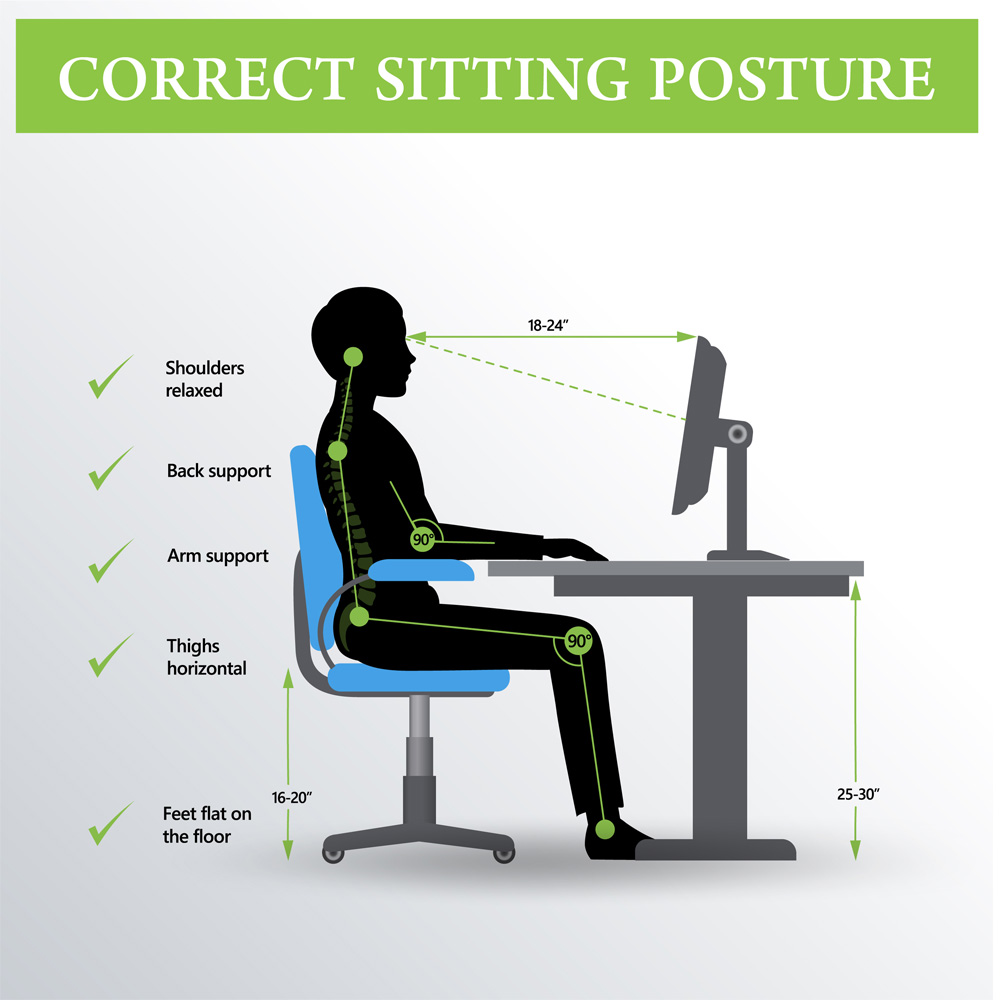
Ergonomics isn’t a luxury — it’s an investment in your health.
Hours of remote work can take a toll on your back, neck, and wrists.
Here’s what makes a real difference:
- Adjustable chair with lumbar support
- Monitor at eye level (use a riser if needed)
- Keyboard and mouse designed for comfort
- Footrest to maintain posture during long hours
🩵 Tip: Try the 20–8–2 rule — 20 minutes sitting, 8 standing, 2 moving.
3. Choose the Right Tech Tools
You don’t need the most expensive gadgets — just the right combination that fits your workflow.
Hardware checklist:
- Laptop stand or external monitor for dual-screen efficiency
- Noise-cancelling headphones (essential for video calls)
- Ring light or soft LED panel for clear video meetings
- High-speed router or mesh Wi-Fi system to prevent connection drops
Software must-haves:
- 📅 Google Calendar for time blocking
- 🧠 Notion or ClickUp for project tracking
- 💬 Slack or Microsoft Teams for communication
- ☁️ Google Drive or Dropbox for easy file access anywhere
🔗 Next-level tip: Sync everything through automation tools like Zapier or IFTTT.
4. Set Up Lighting That Works With You
Lighting affects more than you think — it changes your mood, energy, and even creativity.
✨ Use natural light whenever possible (facing a window sideways, not behind you)
💡 Add warm LED lights to reduce eye strain during late sessions
🌙 Consider a smart light system (like Philips Hue) that adjusts brightness through the day to match your body’s rhythm
5. Design for Focus and Flow
A great setup goes beyond furniture. It’s about how your environment makes you feel.
Try these ideas:
- Keep your desk minimal — remove everything non-essential
- Use zones: one for laptop work, one for reading or planning
- Add a small diffuser with lavender or eucalyptus to promote calm
- Keep cables hidden using organizers or under-desk trays
💬 Remember: A clean desk = a clear mind.
6. Optimize Your Internet and Power Setup
Few things kill productivity faster than a weak connection or power outage.
In 2025, there’s no excuse for lag or interruptions.
🔌 Use a Wi-Fi 6 router or upgrade to fiber if available
🔋 Add a power backup (UPS) for unexpected blackouts
📡 If you work in different rooms, a mesh Wi-Fi extender ensures seamless connectivity everywhere
7. Keep Your Space Work–Life Balanced

When your home becomes your office, boundaries blur fast.
To avoid burnout and distraction:
- Set clear work hours — and stick to them
- Close your laptop at the end of the day (physically helps your brain disconnect)
- Use different lighting or scents to switch from “work mode” to “relax mode”
- If possible, separate your workspace physically — even a curtain divider works
🕯️ Small rituals create big mental shifts.
8. Create a Daily Routine That Supports Your Setup
Your tools matter, but your habits make the real difference.
- Start with movement. A quick stretch or walk signals “work mode on.”
- Plan your top 3 tasks every morning (use Todoist or ClickUp)
- Take micro-breaks every hour — stretch, hydrate, look away from screens
- End your day with reflection. What worked today? What needs adjusting?
📘 Use your setup as a foundation — your consistency will do the rest.
The Perfect Setup Formula (2025)
| Area | Must-Haves | Bonus Tips |
|---|---|---|
| Comfort | Ergonomic chair, footrest, adjustable monitor | Add soft lighting + plants |
| Focus | Noise-cancelling headphones, timer app | Use Brain.fm or Calm |
| Productivity | Notion, Google Calendar, Zapier | Automate your workflow |
| Connectivity | Wi-Fi 6 router, UPS, external mic | Backup internet via mobile hotspot |
| Balance | Separate zones, end-of-day ritual | Add aromatherapy or music |
Your remote work setup isn’t just about equipment — it’s about creating a space that supports your best self.
The right environment helps you stay creative, consistent, and mentally balanced, day after day.
Start small: upgrade one thing this week, whether it’s your lighting, posture, or focus tool.
Each change compounds into lasting productivity.